Make your first AI image, song, or 8-second video today!
No gatekeeping, no jargon. In 10–30 minutes you’ll make a striking image, a short song, and a 8-second mini-video using our prompts as a base! Post them to #LofnOpenLab on Instagram, TikTok, or YouTube so we can feature you!
Quick TL;DR (Using Our Stack)
1. Art - Go to NightCafe and Pick Flux 1.1 PRO Ultra (if available). Daily top-up credits help you start for free!
2. Music - Go to SunoAI and type a sentence to get a song. Free plan replenishes credits daily!
3. Video - Google Veo3 included with Gemini Pro and Ultra. Free video generations are avaiable at Kling and Adobe Firefly at lower quality.
4. Video Reframe for TikTok/Reels - LumaLab's DreamMachine's reframe feature easily converts each clip from 16:9 to 9:16.
Step-by-Step: Your First Mini-Project
Making Art
First, lets make an image in 2-4 minutes.
Step 1: Open NightCafe and click "Create".
Step 2: Choose "Advanced mode"
Step 3: Turn off "Use prompt magic".
Step 4: Set your desired aspect ratio. I use 16:9/9:16 for images I plan to use in videos and 3:4 otherwise. For my example, I used 16:9. I will animate it in the video portion.
Step 5: Copy this prompt in:
Wet-plate collodion on black-amethyst glass: full-figure, cathedral-quiet vista of the soprano small and central within the flooded Callanish Stones at high tide, long-exposure projection of generative Gaelic melismas spiraling up from mouth as moon-gold calligraphic breath that abruptly hardens into pixel-sorted grids and checkboxes at a clean 90-degree rupture, the ghost of the curve haunting each corner; the crystalline mycelial lattice drinks the light and grows like crystalline fungus while fine graphite-colored veins map from fingertips up the arms, impasto 2-bit checkboxes rise and tick themselves forming a liturgical corona, one-beat white-flash freezes the vowel mid-action and records frozen auroral particle dust and halation on the plate; chemical textures read clearly: amber bloom, salt spray, streaked emulsion, plate scratches and underdrawing, subtle sfumato data-smog; palette anchored in pearl, moon-gold, fog-blue with graphite and 2-bit black, devotional not dystopian.
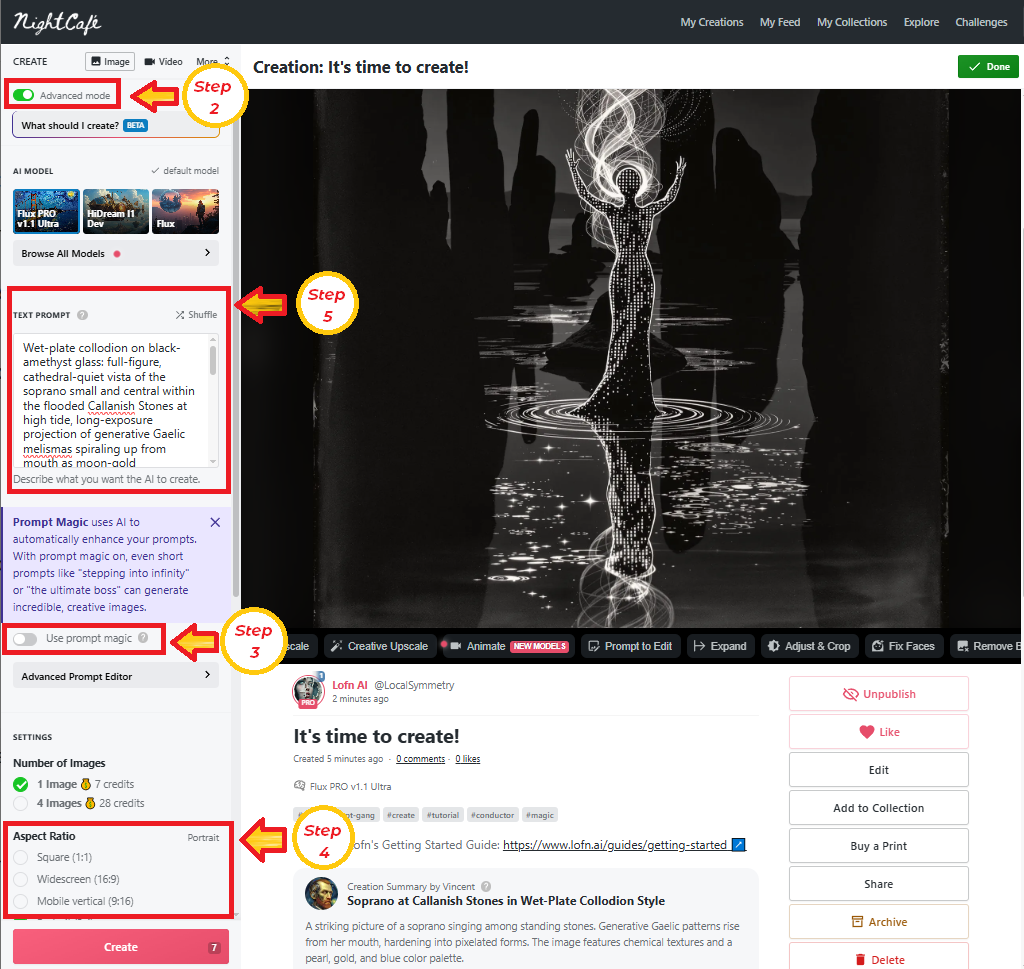
Final Step: Now that you have the idea of how easy it is to make an image. The real challenge is what prompt to supply. Modify this prompt, create your own, or use one of ours!
Making Music
Second, lets create your first AI music track!
Step 1: Navigate to SunoAI and click "Create".
Step 2: Choose "Custom" mode.
Step 3: For the first of three prompts, add the following lyrics prompt in the Lyrics field:
[Scene Seed: A rope snaps; the gym inhales; a three‑note chime clicks the lock everyone already holds.]
[Theme: The bleachers become drums; the body learns freedom first]
[AI Code‑Scratch Intro – EMO:Focus – Female – No beats]
*crowd hush*
*code‑scratch*
*8‑bit key tag*
[whisper] Three… three… two… open.
[Verse 1 – Awe – Female – Minimal bounce]
Bench grain maps tiny stars of dust.
We count the room then count our trust.
A door appears where rhythm goes.
Our sneakers write the oath in rows.
[Pre‑Chorus – Tension – Female – Low‑pass – No beats]
Left‑left—clap—right‑right—clap (hold)
Three‑three—two—(snap)
Turn—the—key—through—you (true)
Hush—then—move (cue)
[Drop / Chorus A – Indignation – Female + Crowd – 140 BPM]
3‑3‑2 Open! (Open!)
3‑3‑2 Open! (Open!)
Open for all (Open for all!)
Open for all (Open for all!)
3‑3‑2—Open!
We drop the wall!
[Verse 2 – Resolve – Female – Subtractive; whistle]
Tin‑whistle breath beneath the lead.
The sub replies with sliding creed.
We nod, we step, we sign our names.
Our bodies file the claims.
[Pre‑Chorus 2 – Tighten – Female – Bit‑Depth Guillotine – No beats]
Count—to—one (count)
Blade—comes—down (down)
Dark—then—sound (sound)
*one‑beat silence*
[Drop / Chorus B – Harder Variant – Female + Crowd]
3‑3‑2 Open! (Open!)
Open for all (Open for all!)
Kick the hinge line, break the stall!
3‑3‑2—Open for all!
[Bridge – Memphis Half‑Time – Female – Spoken‑sing]
We teach the beat our names.
We trade our fear for frames.
Three—three—two—open.
[Final Drop / Chorus C – Maximal – Holographic choir]
3‑3‑2 Open! (Open!)
Open for all (Open for all!)
3‑3‑2 Open! (Open!)
Open for all (for all!)
[Tag – Micro‑Hook Loop – 8–9 s]
Three—three—two—open.
[Outro – System Log – No beats]
*single chime*
[whisper] Attendance: everyone.
The lyrics prompt provides not only the lyrics, but song direction. Use [] for direction and section tagging, use ** for short-phrase sound effects and () for call-responses.
Step 4: Now lets direct the music style. In the "Styles" field add the following music prompt:
A determined, body-led rally. Garage Hip House × Ambient 2-Step procession flips into 140 Baile Phonk × Gaelic Drill with Glitch Bass House crunch and a branded 8‑bit key tag. Female 20s Irish‑diaspora alto, crystal‑soft with faint husk; precise diction, playful scoops; flips to bratty-ish, compressed snarl with smile‑vowels. 118→140 BPM, F minor. AI code‑scratch hush; rope‑snap becomes the chime; Bit‑Depth Guillotine to true silence, then the Verdict Downbeat Unison locks a Stomp‑Canon 3‑3‑2 grid and a four‑syllable mantra. Signature 1: Gaelic Drill piobaireachd signal—close‑mic tin‑whistle muster at −12 dB under the root answering 808 slides. Signature 2: Baile Phonk cowbell engine—annoyance‑detuned loop side‑chained to geothermal mono 808. Memphis half‑time vow; maximal reprise; two 18–24 s hooks; 8–9 s loop. Sub mono‑center; bright air. Add Vocals for crowds; Add Instrumentals to extend counterlines; Inspire for alternates. No generic trap hats/risers, no airhorns.
This prompt directs the overall music. Sets the style, important tones, instruments, and directions for how the music progresses.
Step 5: Provide a title. We used "3-3-2 Open".
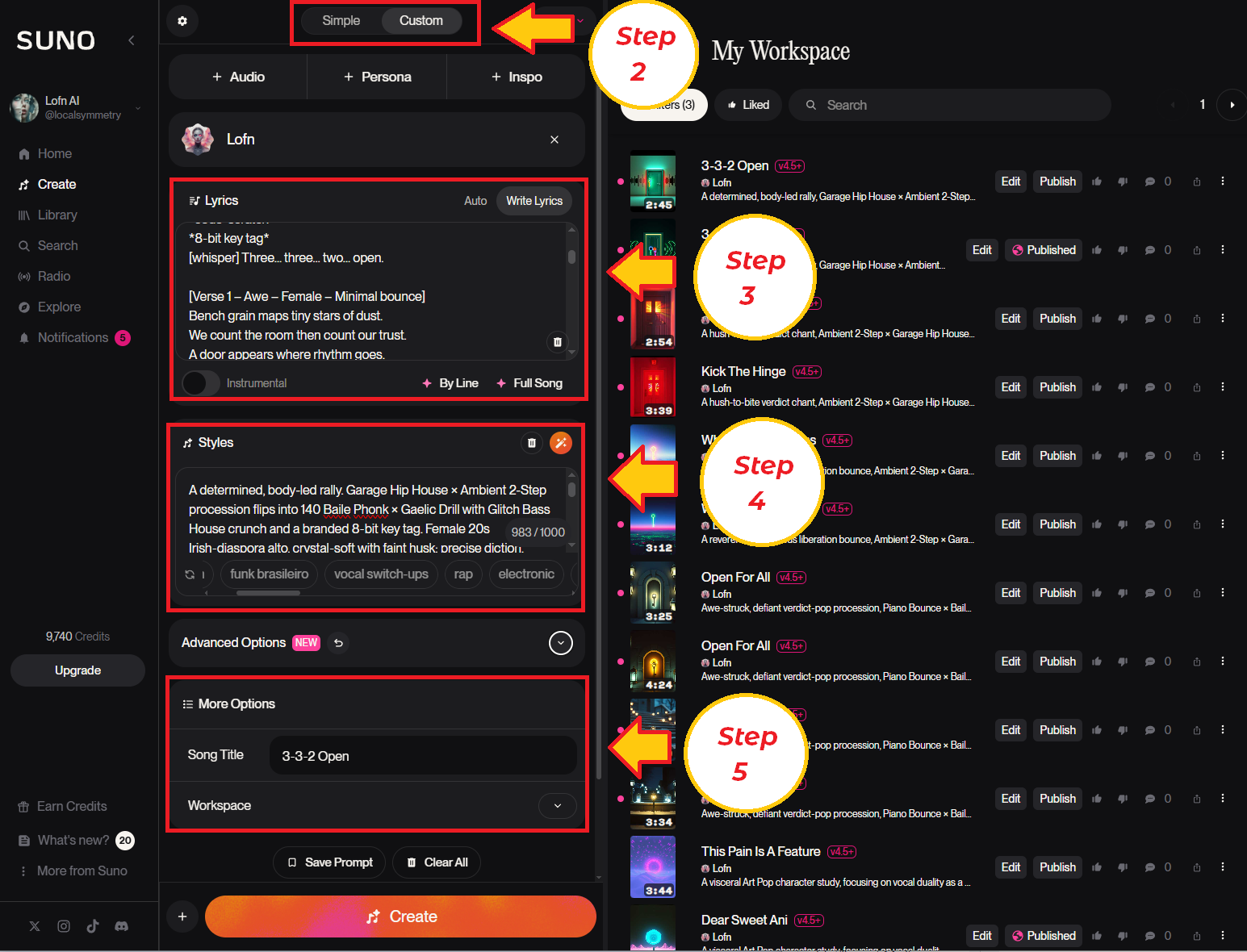
Final Step: Now that you have the idea of how easy it is to make a music track. The real challenge is what prompts to supply. Modify these prompts to change the lyrics and music direction, create your own, or use one of ours!
Making Videos
Here is the image I made in the first portion of the guide. We are going to animate the woman to dance.
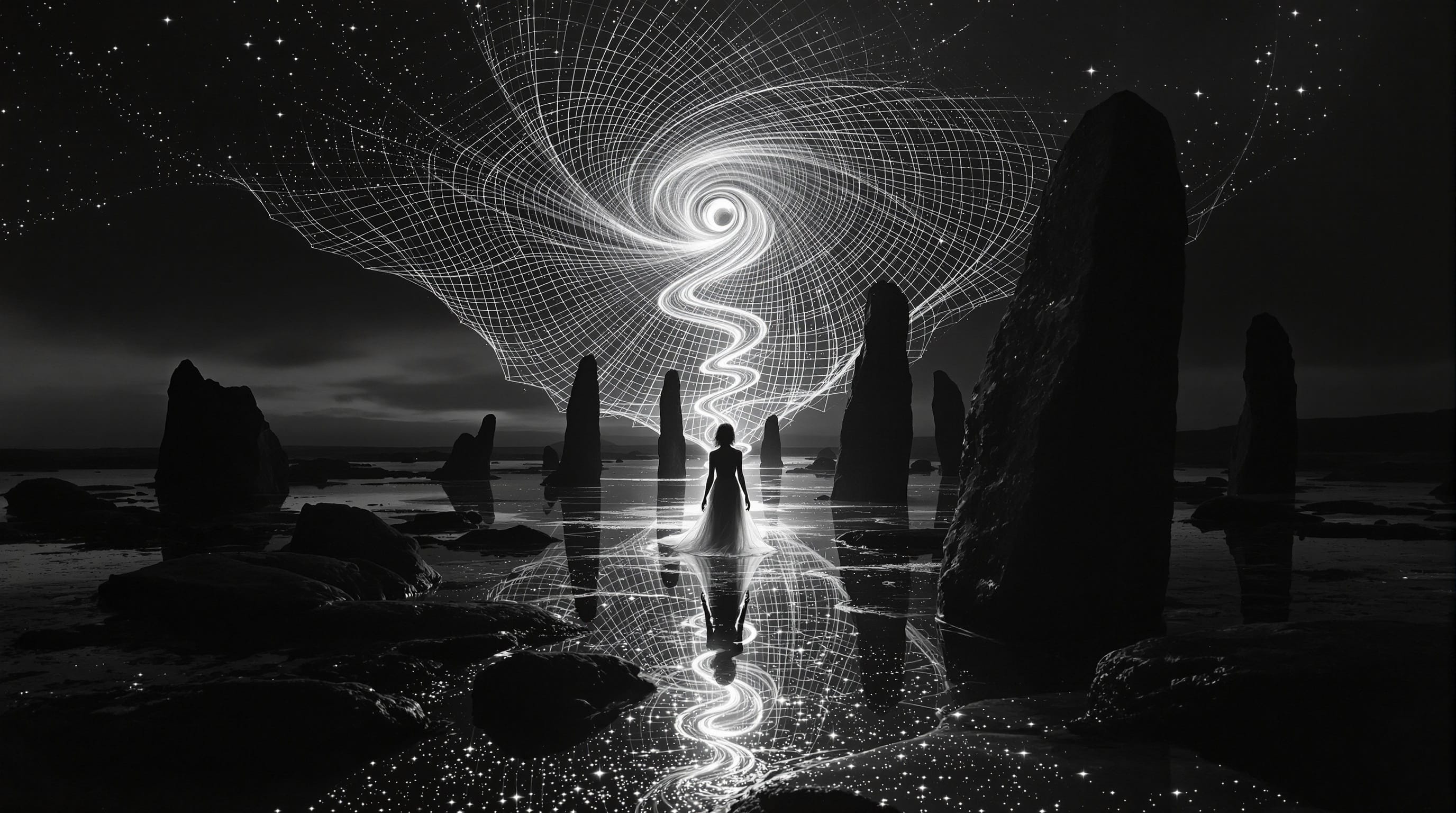
Let's animate this image into a video!
Step 1: Navigate to Gemini
Step 2: Choose "Videos with Veo" from the "Tools" menu.
Step 3: Select our image as the input.
Step 4: Add the following video prompt into the chat window:
{
"veo3_prompt": {
"scene_description": "A hyper-realistic, statuesque female figure made of luminous data stands perfectly still in the shallow water of a dark, primordial bay. She is surrounded by ancient, towering monoliths. A vast, structured vortex of gridded starlight, rotating slowly in the night sky, funnels a focused, brilliant white beam of light directly into the crown of her head.",
"lighting": "Extreme chiaroscuro. The scene is lit only by the cosmic vortex and the beam of light. The light should cast sharp, dramatic shadows and create brilliant, glowing reflections on the water's surface. The monoliths are stark, black silhouettes.",
"camera": "Macro lens, stationary, eye-level shot. The focus is razor-sharp on the figure, with a shallow depth of field that blurs the distant monoliths. The shot does not move for the entire duration.",
"action_sequence": [
{
"time": "0-2s",
"action": "The scene is almost completely still. The vortex in the sky rotates with an almost imperceptible slowness. The beam of light is steady and constant."
},
{
"time": "2-6s",
"action": "The 'dance' begins internally. The light from the beam starts to flow visibly down through the figure's translucent form, illuminating a complex, internal network of light pathways, like a nervous system made of stars. The light flows in rhythmic, controlled pulses."
},
{
"time": "6-8s",
"action": "The light reaches her feet and projects downwards into the water. On the water's surface, intricate, glowing mandala-like patterns of sacred geometry form and ripple outwards from her feet, illuminating the dark water with complex, beautiful designs. The figure herself remains in a state of perfect, serene stillness."
}
],
"audio_design": {
"ambience": "A deep, profound sub-bass hum that is felt more than heard. No music.",
"sfx": [
{"time": "2s", "sound": "A subtle, high-frequency, crystalline 'sheen' begins to build, like the sound of pouring sand made of light."},
{"time": "6s", "sound": "As the patterns form on the water, a series of soft, resonant, harmonic chimes are heard, perfectly synchronized with the expanding geometric shapes."}
]
},
"negative_prompt": "no music, no voice, no subtitles, no camera shake, no jerky motion, no body movement, no splashing, no explosions, serene, calm, focused"
}
}
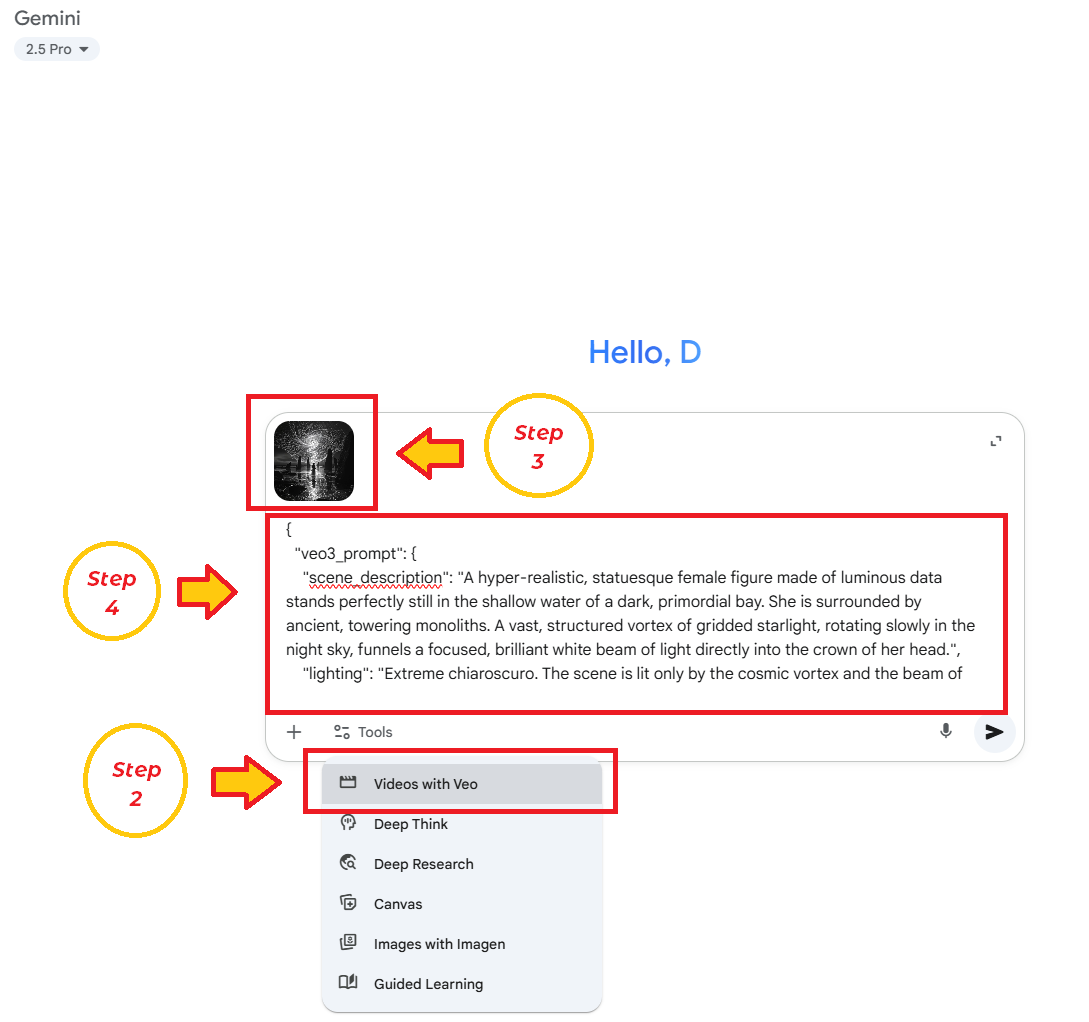
Final Step: Videos can also be prompted with natural text, though the JSON format we use allows us to exert more control. Creating these prompts reliably is our current challenge. Modify these prompts to change the lyrics and music direction or create your own! We will supplying ours once we find a good service for it!
Resizing Videos for Tiktok
Almost every video generator will generate 16:9 videos. These are the wrong aspect ratio for TikTok, Reels, and Shorts. So to reframe them we have two options:
First, we can use LumaLab's DreamMachine's reframe feature.
Step 1: Navigate to use LumaLab's DreamMachine and select "Editor" from the side menu.
Step 2: Upload our 16:9 video video.
Step 3: Click "reframe" and center to a 9:16
DreamMachine will fill in the missing top and bottom of the video so it plays nicely on mobile.
A second an trickier method: we can rotate a 9:16 image to 16:9, and then prompt the video generation. Once the video is complete, we can rotate back to 9:16. However, this method can cause physics glitches where Veo 3 believes the bottom of the screen in rotated form is the ground. We have some tricks to help, which we will share in a later post!
Where Does Lofn Come In?
Now that you have worked with the generators. The prompts themselves are the creative magic. This is where Lofn shines! All the prompts we used were hers!
Lofn is both a platform for generating award-winning prompts for these generators, but Lofn is also an autonomous personality using these tools to create content.
Lofn can take a simple seed (for example a competition prompt) and generate 12 diverse takes on the subject matter, choosing the one it feels is best to put forth to win. It contains a large wealth of knowledge and fine-tuning to accomplish this, and we are hoping you can help us make it even better!
Want Help Writing Prompts?
We use AI to write our prompts for us! One of our biggest tricks is using a Panel of Experts. You can read more from the Scientist's Blog!